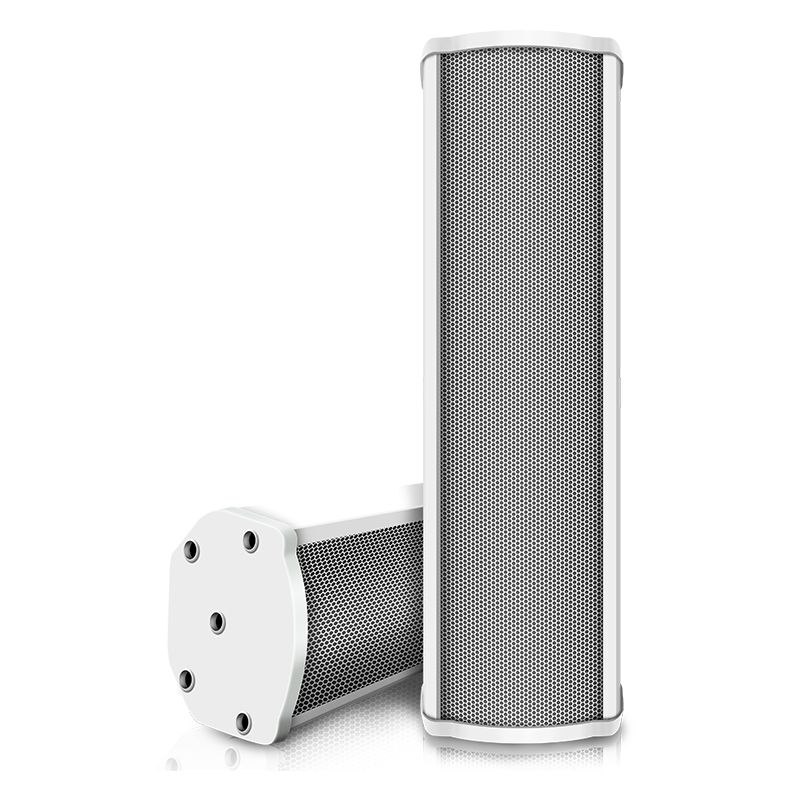
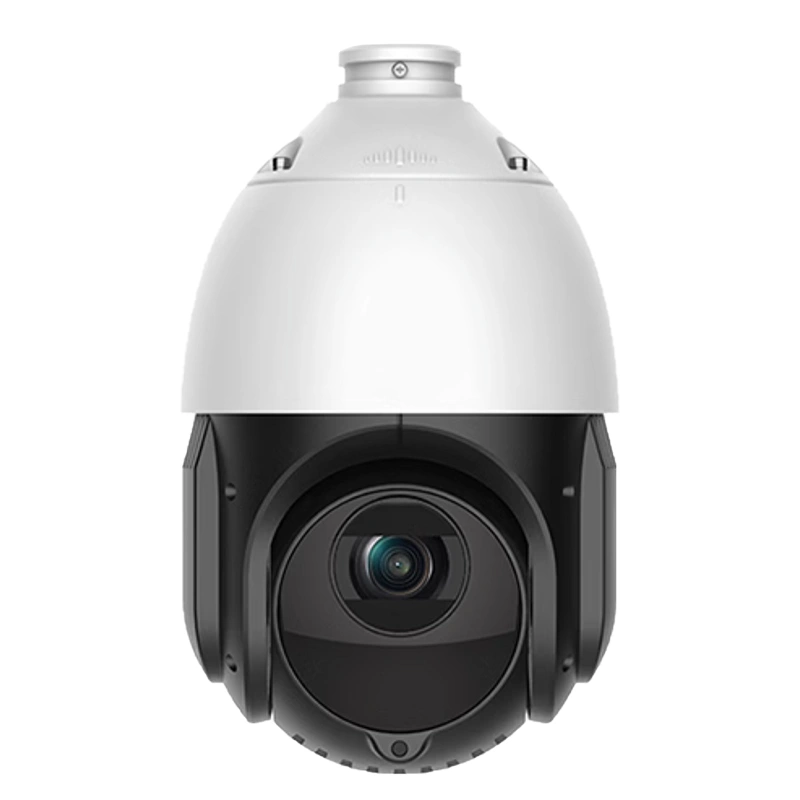
Paging Console Packing List
-Model name: BS-Z19G1/BS-P19G1
-Scope of application: This intercom with video system is suitable for a management center, residential property, parking lot duty room, etc.
-Type and specification: eight-inch horizontal screen display.
-Use environment: put it indoors at normal temperature and humidity.
-Unpacking configuration: 1 power adapter, 1 base, 1 handle, 1 handle wire, manual, and warranty card.
------------------------------------------------------------------------------------------------
Paging Microphone SAR Value Standard
| SAR safety standard | SAR test program standard | Current test data |
| 2.0W/kg | ES59005 | 1.8 |
Paging Console Cloud Agent Management Machine Product Instruction
Dear users: Hello!
First of all, thank you for choosing the paging console management machine products designed and produced by our company!
This product has a built-in wired network function, built-in high-performance 2.4G WiFi and Bluetooth communication module, and has the functions of communication and communication, which can meet your individual needs.
Before you use this paging microphone, please read all the materials we provide at random carefully. This manual will introduce you to the functions of this machine. Through it, you can get the knowledge introduction of related functions and usage of this product, so that you can get a more relaxed and convenient operation experience.
Our company is not responsible for the loss and damage of personal data caused by software and hardware misoperation, product maintenance, battery replacement, or other unexpected situations, nor for other indirect losses caused thereby.
At the same time, we can't control the possible misunderstanding caused by users of this manual. Therefore, our company will not be responsible for any unexpected losses that may occur during the use of this manual, and will not be responsible for any third-party claims caused by the use of this product. The functional information of this manual is subject to the product itself. We will continue to develop and provide new functions, and relevant information will be changed without prior notice.
The information in this manual is protected by copyright, and any part of it is not allowed to be copied or reproduced in any way without the prior written permission of our company.
Our company reserves the final interpretation right of this manual, three guarantee certificates and related materials. (Note: There may be errors and omissions in the compilation of this manual. Please give me your understanding and sincerely welcome your criticism and correction. If you find any problems in the process of using this product, please contact the distributor in time to negotiate and deal with them. Thank you for your support and cooperation.)
Paging Microphone Appearance And Interface
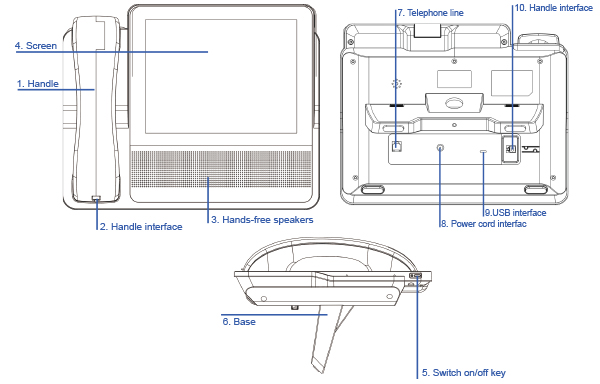
| 1 . Handle | Off-hook and call | ||
| 2 . Handle interface | Call handle interface, please use the matching handle to ensure the call quality. | ||
| 3 . Hands-free speakers | Used in a hands-free telephone conversation. | ||
| 4 . Screen | Dial telephone and other operating areas | ||
| 5 . Switch on/off key | Intelligent cloud seat management machine | ||
| 6 . Base | Support the phone to place the desktop. | ||
| 7 . Telephone line interface | RJ111 telephone line interfaces are used to connect PSTN telephone lines. | ||
| 8 . Power cord interface | 12V power input. As the phone requires a high power supply, please use the original power supply for charging, otherwise, it will affect the normal telephone voice effect. | ||
| 9 .USB interface | Can be connected to computers and other devices. | ||
| 10. Handle interface | Call handle interface, please use the matching handle to ensure the call quality. | ||
Paging Console Specifications And Parameters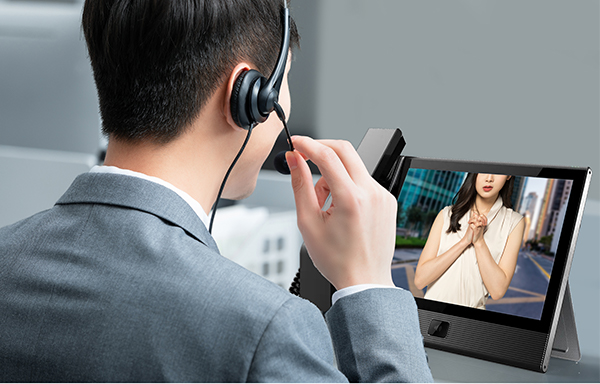
| Parameter | Characteristic Description |
| Monitor | 8 inch 1024*768 |
| Touch screen | G+G capacitive screen 5-point touch |
| WIFI | 2.4G WIFI network |
| USB interface | Micro USB OTG 2.0 |
| Handle interface | RJ9 standard |
| Component name | Lead (Pb) | Mercury(Hg) | Cadmium(Cd) | Hexavalent chromium(Cr6+) | Polybromi nated biphenyls(PBB) | Polybrominated diphenyl ethers(PBDE) |
| Structure | O | O | O | O | O | O |
| Circuit board | X | O | O | O | O | O |
| Wire cable | X | O | O | O | O | O |
| Battery | X | O | O | O | O | O |
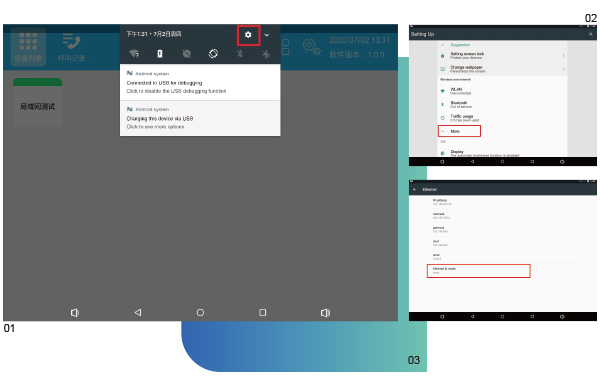
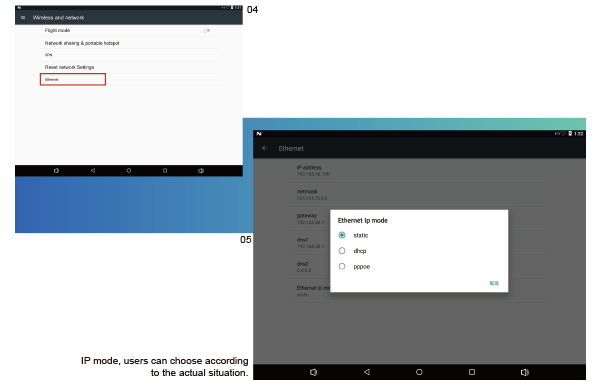
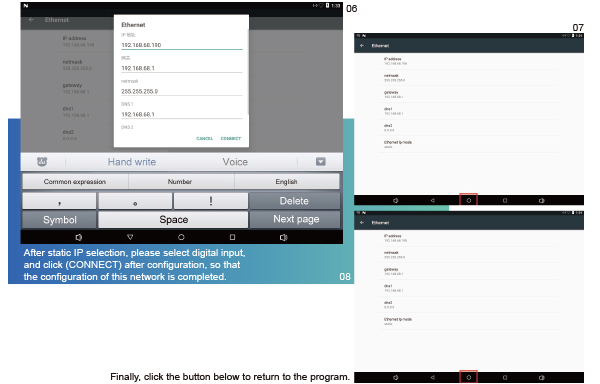
Paging Microphone Operating Instructions
Attention Notes
1. Please keep the machine away from the strong magnetic field, which may damage the machine.
2. When using, do not let the machine fall, or rub against hard objects, otherwise it may cause the machine surface to be scratched, the battery to fall off, data loss or other hardware damage, which may cause the machine to fail to start.
3. Do not expose the equipment to a wet environment or rain. If the equipment is flooded or wet, it may cause equipment failure or even be unable to be repaired.
4. Do not clean the machine with chemical agents or cleaning agents, which will damage the machine's surface and corrode the paint.
5. Don't shut down the power suddenly during software upgrades or uploads and downloads, or it may cause data loss or program error.
6. It is forbidden to use the overloaded power supply, bend the power cord forcibly, or squeeze the power cord with heavy objects, so as not to cause heat and fire.
7. It is forbidden to unplug the power supply with wet hands to prevent electric shock.
8. Some films, music, and pictures may have a copyright. Playing these files without permission will violate the copyright law.
9. When the use of wireless devices is prohibited or the use of devices will cause interference or danger, please don't turn it on.
10. All wireless devices may be interfered, thus affecting the performance.
11. Please observe any relevant restrictions. Wireless devices can interfere with aircraft. If you use this machine on the plane, please consult the airline first. You must be very careful when using electronic equipment during the flight.
12. Do not use this equipment in the gas station. Do not use this equipment near fuel or chemicals.
13. Please observe any relevant restrictions. Do not use this equipment in the place where the blasting operation is carried out.
14. Only professional maintenance personnel can install or repair this equipment.
15. Please use the original accessories and batteries. Do not use products that do not match.
16. This equipment is not waterproof. Please keep it dry.
17. Back up the important information stored in this equipment or keep a handwritten record to prevent it from being lost.
18. When connecting other devices, please read the user manual of the device for detailed safety instructions. Do not connect products that do not match.
19. If the actual settings and usage of this product are inconsistent with this manual due to the loss of firmware, please contact us.
Attached
Operating instructions for managing host mode switching
Note: Make sure the management host network is normal before switching modes.
--------------------------------------------------------------------------------------------------------
--------------------------------------------------------------------------------------------------------
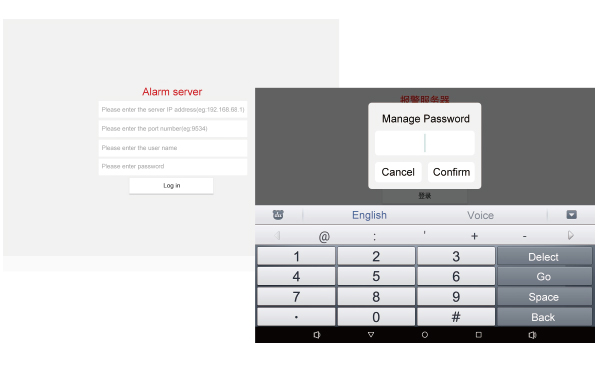
In alarm server mode, switch to LAN version:
Clear all login information and click the login button five times in a row
Click the login button 5 times and it will pop up.
Enter the password (month+days, for example, August 16, 2012,
the password is 6180, and after confirmation, the management
the machine will be restarted, and after the restart, it will
switch to LAN mode.
In LAN mode, switch to the alarm server version:
Click the area shown in the figure below, and the password input box will pop up after five clicks.
--------------------------------------------------------------------------------------------------------
--------------------------------------------------------------------------------------------------------
The password box pops up after 5 clicks.
The password is the same as above. After the password is entered and confirmed, the management machine will automatically restart. After the restart, it will automatically
switch to the alarm server mode.