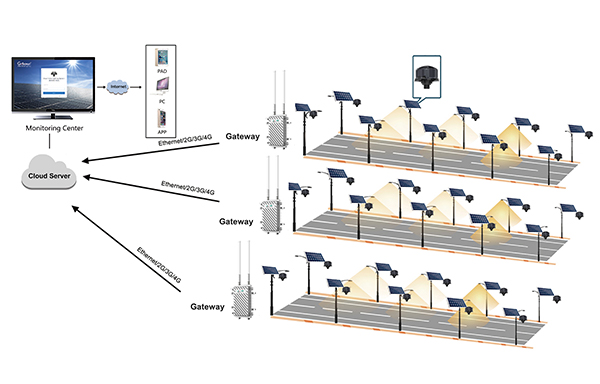
Wireless ZHAGA Controller with LED driver and communicate with LCU by Solar(LoRa-MESH)
BS-SC851/S(ZHAGA)
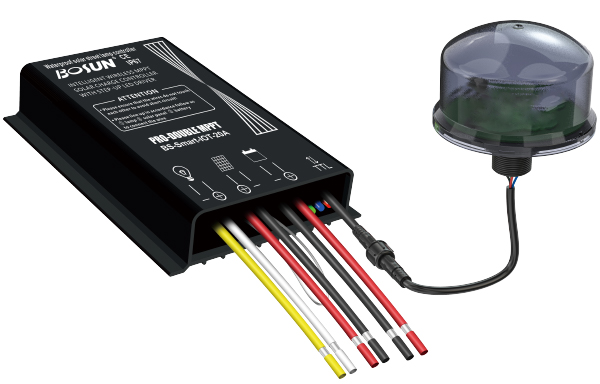
The solar interet of Things module is a communication module that can adapt to the solar street light controer. The module has 4G Cat.1 communication funcion and can remotely connect to the server in the cloud. At the same time, the module has exteral / RS485 / TTL communication interface, which can complete the delivery and reading of the parameters and stalus of the solar controler.
Quantity
The solar interet of Things module is a communication module that can adapt to
the solar street light controer. The module has 4G Cat.1 communication funcion
and can remotely connect to the server in the cloud. At the same time, the
module has exteral / RS485 /TTL communication interface, which can complete
the delivery and reading of the parameters and stalus of the solar controler.
Mainper for mance characteristics of the controller:
·cat1.wireless communication
·Suitable for 12V/24V input voltage
·Computer interface and mobile phone wechat mini program remote control
and information reading
·You can remotely switch the load and adjust the power of the load.
·Read the voltage/current'power of the battery/load/solar panel inside the
controller
·Fault alarm, battery, solar panel, or load fault alarm.
·Remotely delivers and reads parameters of multiple or a single controller
·Module has the function of base station positioning
·Supports remote firmware upgrade

| Pilot lamp | Status | Function |
| AC Input | Very slow (On 0.3s, Off 5s) | No SIM card detected |
| Slow (On 0.3s, Off 2s) | Normal, powering up | |
| Intermediate (On 0.3s, Off 1s) | Connecting to the network | |
| Fast (On 0.1s, Off 0.1s) | Network connected |
| Model | BS-SC851/S |
| Supply voltage | 12V / 24V |
| Communication mode | LoRa |
| Operation temperature | -45°C-65°C |
| IP code | IP67 |
Connection mode
For safety, connect cables according to the sequence of connecting loads, batteries, and photocells.
The antenna should avoid direct contact with metal(includingshielded functional items) and cannot be placed in a completelyclosed iron container. In addition, the installation should be fixedfirmly, and avoid scratches and insulation damage to the line.
(A)Connection load
At this time, the controller has not started to work, and the controller has no responseafter the connection is completed.
At this time, the controller has not started to work, and the controller has no responseafter the connection is completed.
(B) Connect the optical panel
The controller can be used for 18V or 36V standard solar modules, and can also beused for solar modules whose open circuit voltage does not exceed the specifiedmaximum input voltage. The maximum power point voltage of the solar module shouldnot be lower than the battery voltage.
The controller can be used for 18V or 36V standard solar modules, and can also beused for solar modules whose open circuit voltage does not exceed the specifiedmaximum input voltage. The maximum power point voltage of the solar module shouldnot be lower than the battery voltage.
(C)Connect the four-core wires of the controller to the four-core wires of the module.Observe the indicator on the module. Quick flash for online.
(D)Connect the antenna: Fix the antenna on the housing and connect the appliance through the antennaextension cable